Understanding round statistics: Usage and philosophy
The evaluation method in the "StrokesIn" app takes into account the quality of the tee shot and the follow-up shots required to reach the green. The effectiveness of the strokes is evaluated, including aspects such as placement on or near the green.
However, particular attention is paid to the quality of the approach shots around the green.
Approach play plays an extremely important role when it comes to achieving a low score, as it is crucial to place the ball precisely and close enough to the hole to maximise the chances of a successful putt and thus improve the overall score.
Note: The decision not to record shot lengths and clubs used is based on the fact that this information is considered less relevant for an evaluation. A golfer's overall performance is not solely defined by specific shot lengths with specific clubs, as factors such as daily form and external conditions can strongly influence this aspect. With increasing playing experience, a golfer learns to judge with which club he can achieve a required length.
How the golf round calculation and performance statistics work
The app uses the strokes recorded on the scorecard to determine the exact total number of strokes for the round. It also carries out a detailed analysis of birdies, pars, bogeys, etc. and other key performance indicators. The precise recording and evaluation of putts, fairway hits and approach shots is carried out by recording the corresponding shots using shot type icons, which provides a more precise insight into performance. Important key figures such as green-in-regulation, Par rate as well as Pitch-, Greenbunker-, Chip- and Chip-Putt rate are calculated and integrated into the overall evaluation - "Record little, analyse a lot."Procedure
The StrokesIn round statistics are based on the fact that the main strokes on a fairway are recorded using shot type icons.
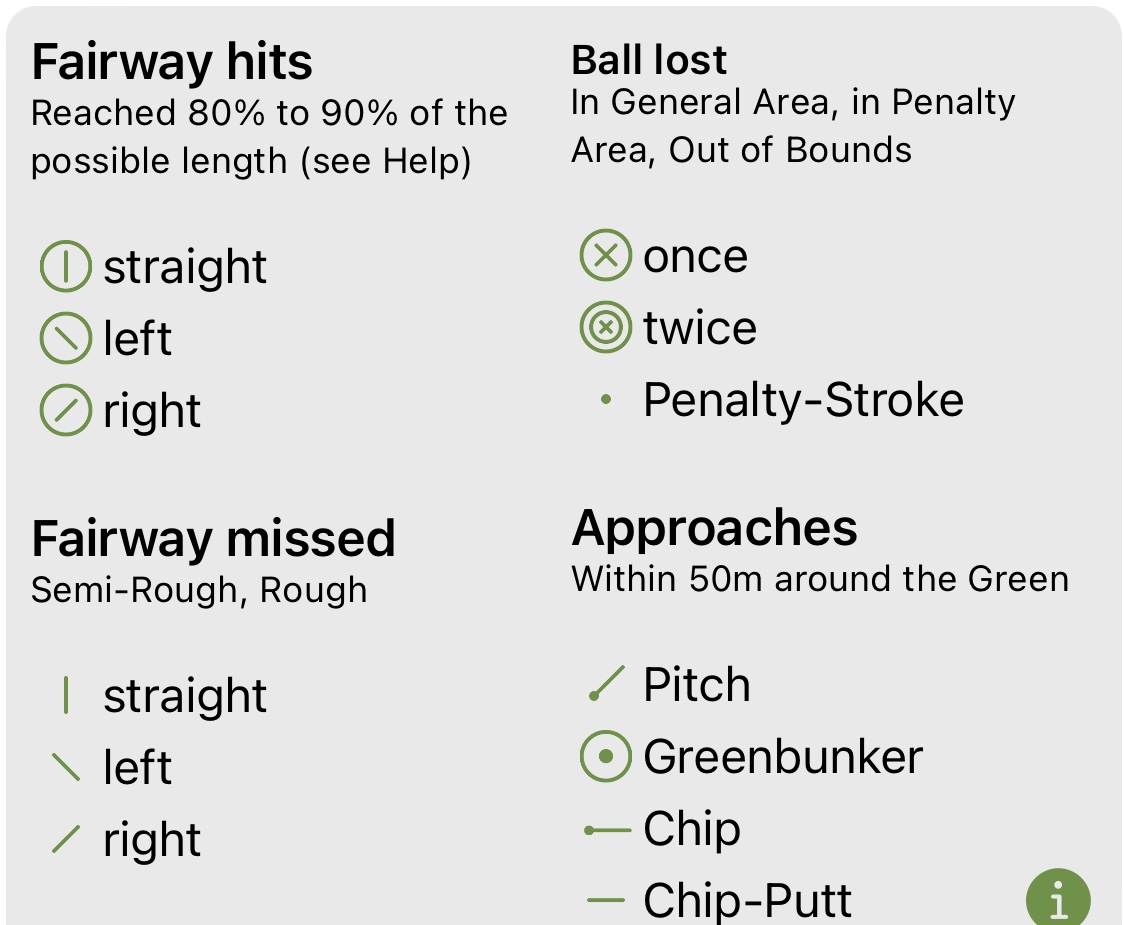
The recording of the stroke types using the icons on the scorecard could be done as follows:
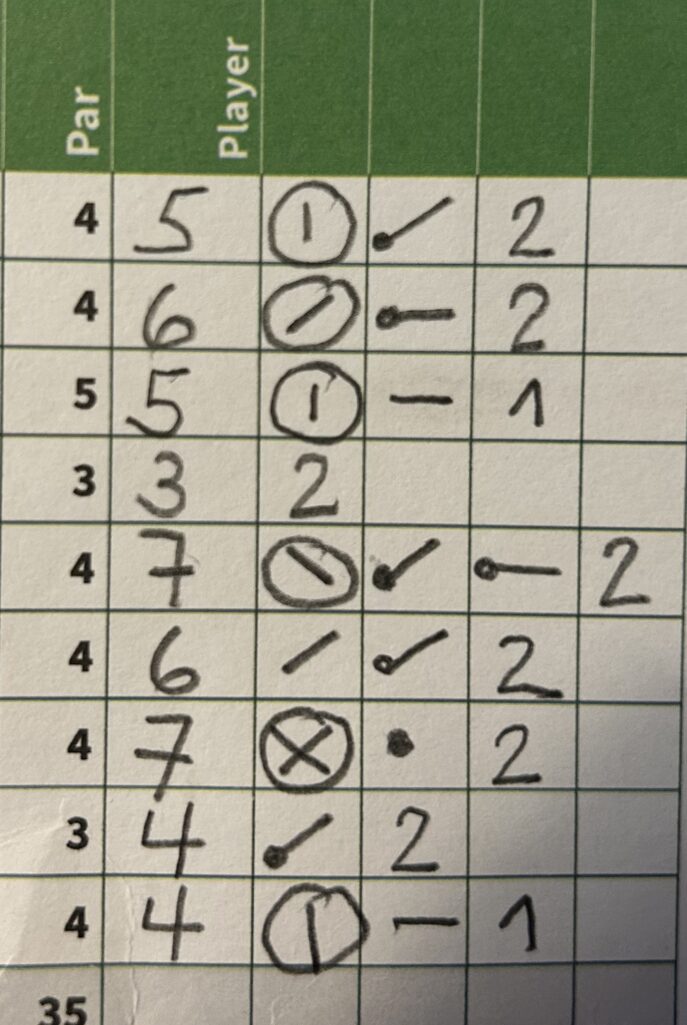
Evalutation of the tee shot
A fairway is considered missed if the ball comes to rest in the semi-rough or rough or has not reached the possible length, depending on the skill level.
*The length of a fairway shot varies according to individual skill level. Lower level players often hit shorter shots, while more advanced players tend to be able to hit longer shots. The 'possible length' refers to what a player can achieve with their skill level. A fairway hit means that the ball should reach at least this possible distance. For lower level players, a target of 80% may be more realistic, while more advanced players may prefer a target of 90% as they tend to hit longer shots more consistently.
The tee shot is considered lost if the ball is lost in the General Area, a penalty area or out of bounds. In this case, a penalty stroke must be recorded.
Fairway shots and Green in Regulation are automatically calculated and analysed by the app based on the number of shots on the respective fairway. In case of lost balls in the General Area or in the penalty area, a penalty stroke must be recorded. Shots outside of 50 metres around the green count as shots from the General Area and are taken into account by the app, but are not specifically evaluated.
Pitch-, Greenbunker-, Chip- and Chip-Putt shots that are within 50 metres of the green are considered approach shots and are recorded accordingly. When calculating and analysing the Pitch-, Greenbunker-, Chip- and Chip-Putt rate, the respective shot and the further shots required to hole are taken into account.
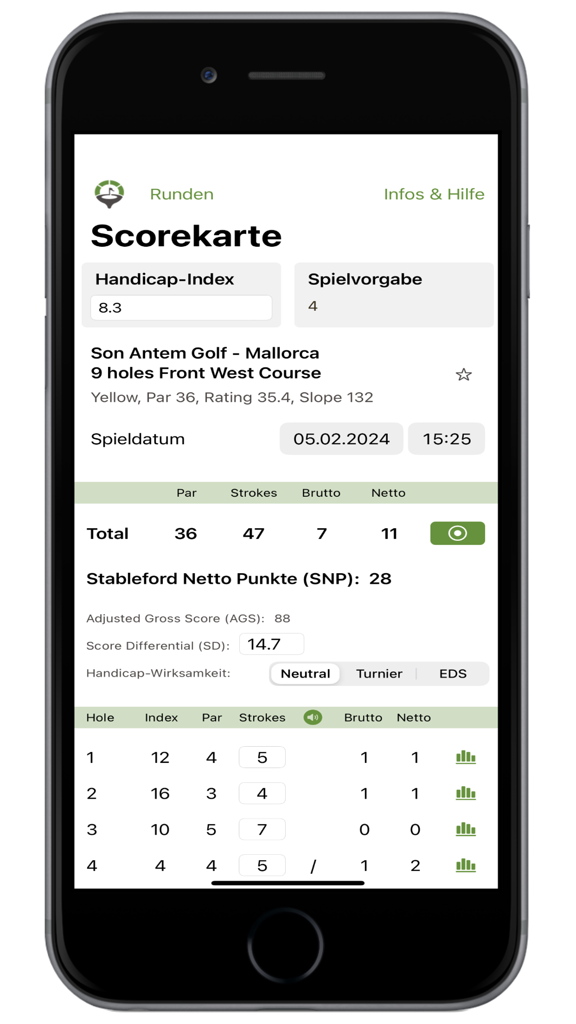 Record statistical data
 Selecting the "Statistics" button on the scorecard opens the recording page.
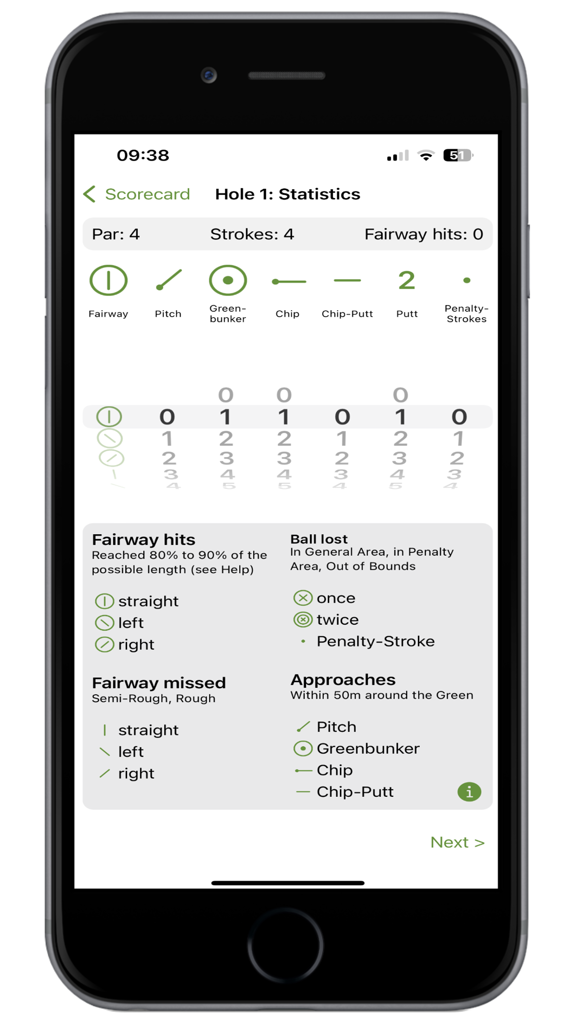 Now transfer the shot types for the first hole from your scorecard to the app by making the appropriate settings using the "wheels".
Click on "Next" to go directly to the recording page for the second hole and so on.
On par 4 and 5, the "Wheel preset" is automatically set to "Fairway hit straight".
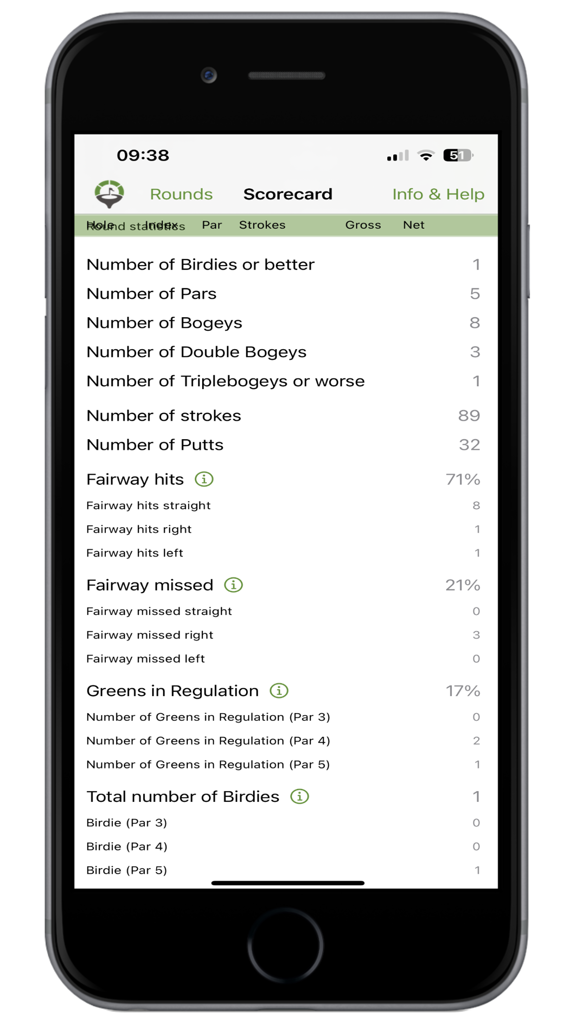 Evaluation of the round played
Once the data has been transferred entirely, the round analysis can be seen in the continuation of the scorecard (scroll down).
Results
The achieved birdies, pars, bogeys and double bogeys are displayed in absolute figures for the round played.
Number of strokes
The number of strokes is displayed in absolute figures for the round played.
Number of Putts
The number of putts is displayed in absolute figures for the round played.
Fairway hits
The evaluation shows the percentage of fairway hits on the Par 4 and Par 5 holes of the golf course played. In addition, the absolute numbers of fairway hits that landed straight, to the right or to the left are displayed.
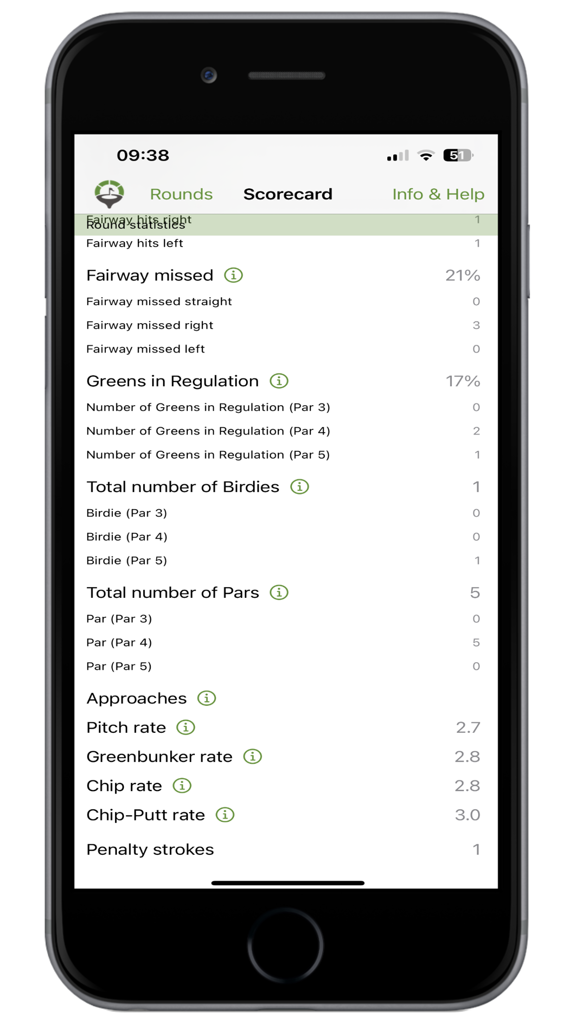 Fairway missed
The evaluation shows the percentage of missed fairways on the par 4 and par 5 holes of the golf course played. The absolute numbers of missed fairways that landed straight, to the right or to the left are also displayed.
Greens in Regulation
The analysis shows the percentage of "green in regulation" (GIR) on the holes played on the golf course. In addition, the absolute numbers of "Green in Regulation" (GIR) are displayed for par 3, par 4 and par 5 holes. "Green in Regulation" (GIR) is a golf statistic that indicates how often a player has reached the green with the prescribed number of strokes.
Note: For experienced golfers, "Green in Regulation" (GIR) often serves as an important indicator to evaluate their fairway shots and approach shots and to efficiently achieve low scores. However, inexperienced golfers should not focus solely on achieving GIR, especially if they are just starting out in the game. Instead, they should focus on hitting the fairway and approach shots (shots around the green within 50 metres). It is important that inexperienced golfers do not get discouraged if they do not achieve GIR regularly, as this takes time and practice.
Total number of Birdies
The number of birdies played on the par 3, par 4 and par 5 holes is displayed in absolute figures.
Total number of Pars
The number of pars played on the par 3, par 4 and par 5 holes is displayed in absolute figures.
Approach shots
Pitch-, greenbunker-, chip- and chip-putt shots within 50 metres around the green are considered approach shots.
Pitch-, Greenbunker-, Chip- und Chip-Putt Rate
The pitch-, greenbunker-, chip- and chip-putt rate shows the average number of strokes required to hole out, whereby the actual pitch-, greenbunker-, chip- or chip-putt shot is also counted. A pitch rate of 3.0 would mean that after a pitch shot, two more shots are needed to hole out. Players with a value of 2.0 are considered good, while very good players even have a value below 2.0. This indicator provides information about the effectiveness of approach shots and putting behaviour on the green.
Penalty strokes
The number of penalty strokes for the round played is displayed in absolute figures.
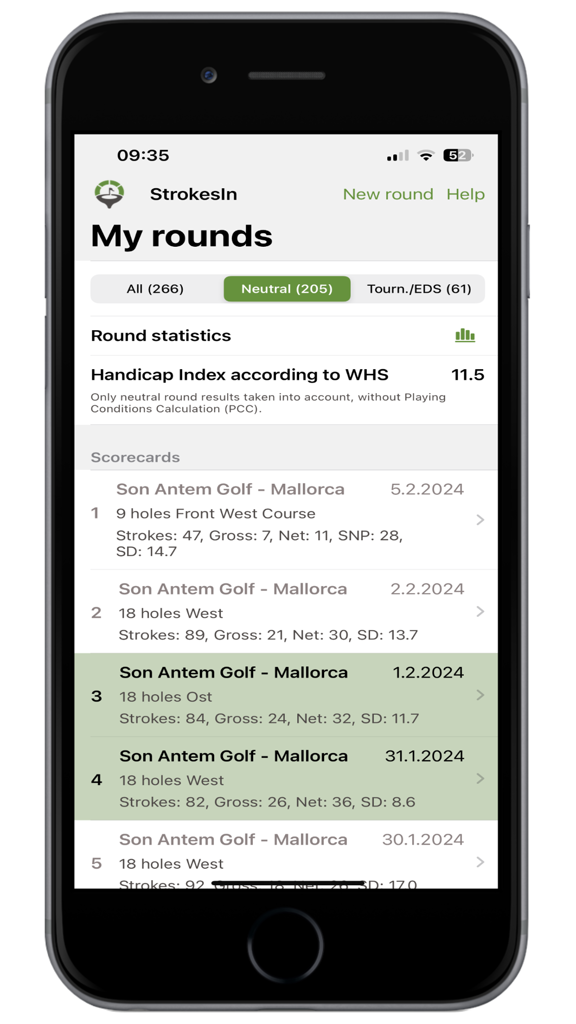 Round evaluation over several rounds played
 From the "My rounds" list, you can open the analysis for several rounds by selecting the statistics icon.
To ensure that the evaluation is done for the correct number of rounds, please select the appropriate tab.
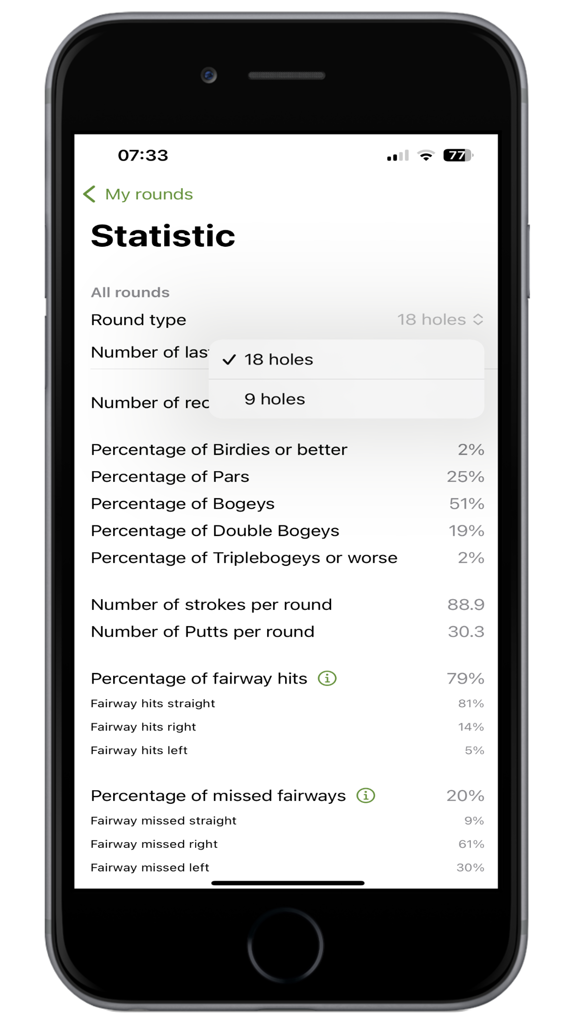 Evaluation over several rounds
Round type: Select here whether you wish to analyse the 18-hole or 9-hole rounds.
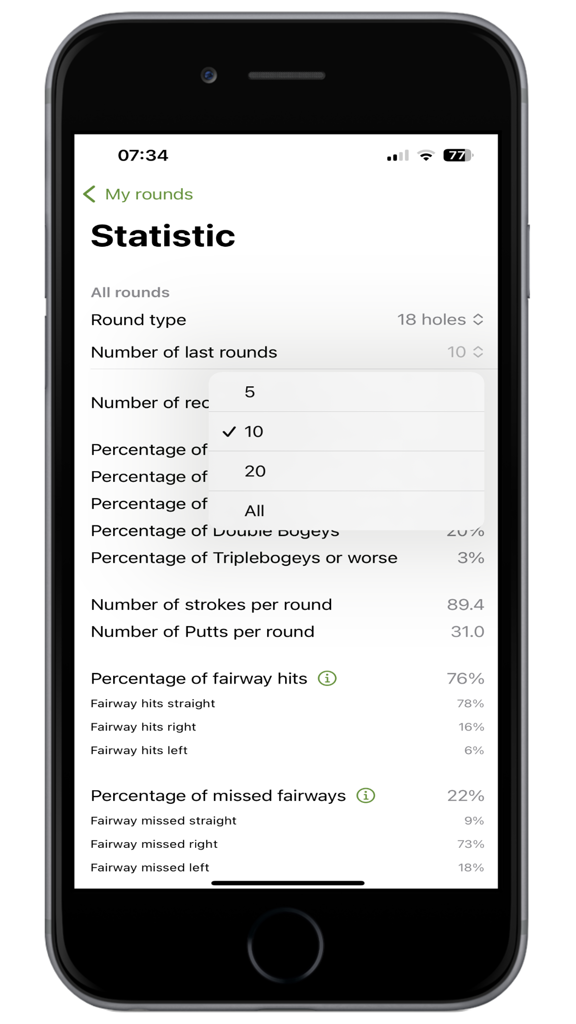 Evaluation
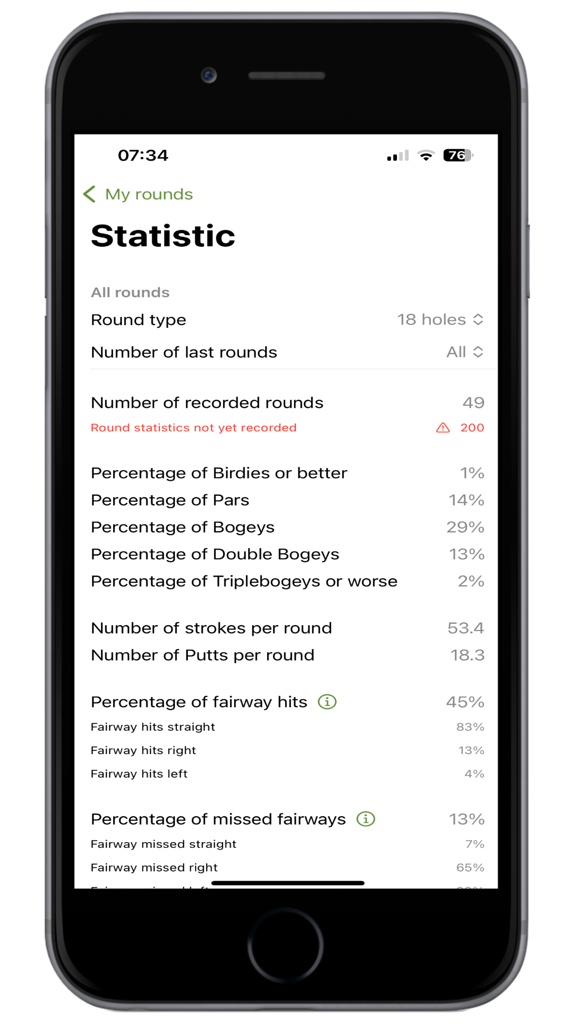 The evaluation is based on the number of the last recorded laps.
If there is a lap in the selection for which no statistical data has been recorded, you will receive the following message.
In the example opposite, 29 laps out of 160 are included in the evaluation calculation.
Results
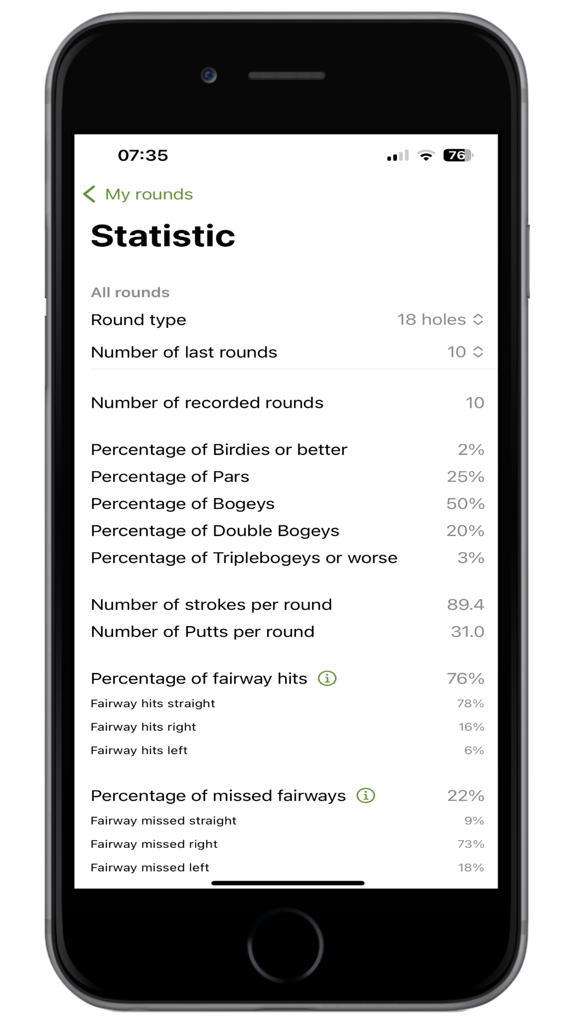
The proportions of birdies, pars, bogeys and double bogeys are calculated and displayed based on the number of rounds recorded.
Number of strokes
The average number of strokes required over the number of rounds recorded, in absolute figures.
Number of Putts
The average number of Putts required over the number of rounds recorded, in absolute figures.
Percentage of Fairway hits
The evaluation shows the percentage of fairway hits on the par 4 and par 5 holes over the number of recorded rounds. The proportion of straight, right and left fairway hits is also displayed.
 Percentage of fairways missed
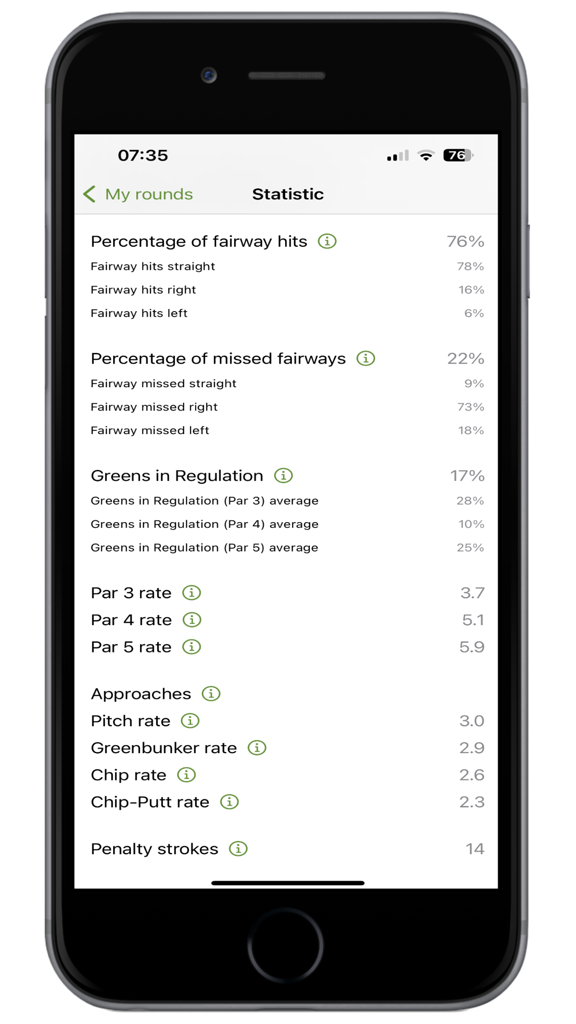
The analysis shows the percentage of missed fairways on the par 4 and par 5 holes over the number of rounds recorded. The proportion of fairways missed straight, right and left is also displayed.
Greens in Regulation
The analysis shows the percentage of "Green in Regulation" (GIR) over the number of rounds recorded.
Note: For experienced golfers, "Green in Regulation" (GIR) often serves as an important indicator to evaluate their fairway shots and approach shots and to efficiently achieve low scores. However, inexperienced golfers should not focus solely on achieving GIR, especially if they are just starting out in the game. Instead, they should focus on hitting the fairway and approach shots (shots around the green within 50 metres). It is important that inexperienced golfers do not get discouraged if they do not achieve GIR regularly, as this takes time and practice.
Par 3 Rate
The evaluation shows the average number of strokes for par 3 holes over the number of recorded rounds. This value indicates the average number of strokes required to play par 3 holes.
Par 4 Rate
The evaluation shows the average number of strokes for par 4 holes over the number of recorded rounds. This value indicates the average number of strokes required to play par 4 holes.
Par 5 Rate
The evaluation shows the average number of strokes for par 5 holes over the number of recorded rounds. This value indicates the average number of strokes required to play par 5 holes.
Pitch-, greenbunker-, chip- and chip-putt shots within 50 metres around the green are considered approach shots.
Pitch-, Greenbunker-, Chip- und Chip-Putt Rate
The pitch-, greenbunker-, chip- and chip-putt rate over the number rounds recorded, shows the average number of strokes required to hole out, whereby the actual pitch-, greenbunker-, chip- or chip-putt shot is also counted. A pitch rate of 3.0 would mean that after a pitch shot, two more shots are needed to hole out. Players with a value of 2.0 are considered good, while very good players even have a value below 2.0. This indicator provides information about the effectiveness of approach shots and putting behaviour on the green.
Penalty strokes
The number of penalty strokes over the rounds recorded is displayed in absolute figures.