RulesLive in Action: How Image Recognition Works on the Golf Course
With our RulesLive app, we want to offer golfers quick and intuitive support directly on the course - especially when it comes to the correct application of the rules of golf. A central feature of the app is image recognition, which recognizes symbols and markings on the golf course and links them to the corresponding rules.
There are many visual markings on the golf course that are crucial for applying the rules of golf. These include, for example:
- Red posts: indicate a penalty area (lateral water hazard)
- Yellow posts: Mark a penalty area (frontal)
- White posts: Indicate the out-of-bounds area
- Blue posts: Indicate ground under repair (GUR)
- Boards, lines, special markings: Often court-specific and have their own rules instructions
These clearly defined symbols can be recognized particularly reliably by our app - provided that the images are taken from a suitable perspective and distance.
Our tests on various golf courses have shown that the best recognition results are achieved with clear, focused shots of individual symbols.
- Close-up of the marking or symbol (e.g. only the red post in the picture)
- No backlighting or strong shadows
- Focus on the main symbol, no distracting objects in the background
- No wide landscape images - these often lead to unclear recognition
Example: A red post, close and clear in the image = reliably detected
A wide-angle image with several colored posts = uncertain evaluation
In the following section, we show various photos that we took directly on the golf course. They demonstrate typical scenarios and how well the app recognizes which rules are involved in these cases.
In this case, the app searched for the rule on “signposts or signs” - i.e. a movable obstruction.
However, as the image was strongly focused on the tree in the background, the app incorrectly recognized “trees and bushes”.
Tip: When taking a picture, make sure that the focus is on the actual symbol - not on the surroundings. This will significantly increase the accuracy of image recognition.

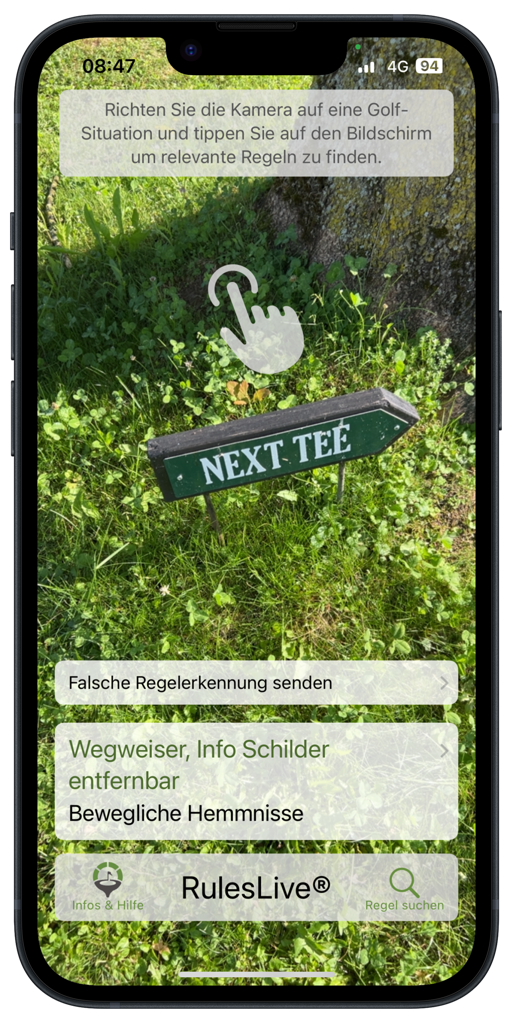
Example: Incorrect focus - unclear detection
In this case, the app searched for the rule on “fences or nets” - i.e. an immovable obstruction.However, as the image was taken from too far away and the focus was not clearly on the fence, the app recognized several different objects.
This led to different, ambiguous rule suggestions.
Conclusion: For reliable detection, the object being searched for - in this case the fence or net - should be clearly in the focus and clearly recognizable.
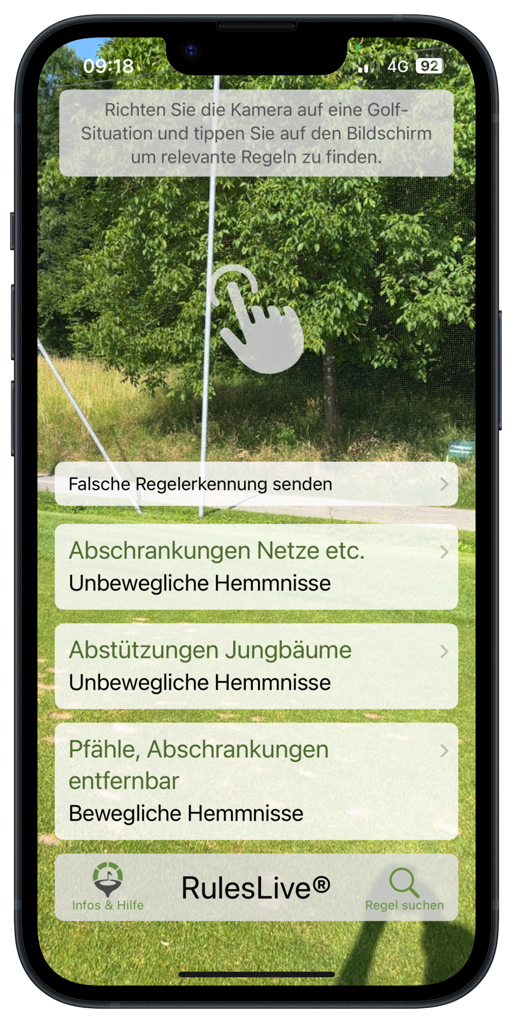

RulesLive helps you to immediately know what's going on, even without a rulebook. To get the best out of the app, it's worth paying attention to perspective, proximity and clarity when taking pictures.
The clearer the symbol in the image, the more precise the rule recognition.